SIM  card for China
Cheap data and a Chinese number, but blocked apps stay blocked. How to buy one, and whether you need to.
Not tested by us yet: the steps below come from public reports until we’ve bought one ourselves.
Do you need a SIM card at all?
Probably not for a short trip. A Chinese SIM card gives you cheap local data and a Chinese phone number, but it blocks the same apps as hotel Wi-Fi: Google, WhatsApp, Instagram and the rest. If you’d miss those, a roaming eSIM will suit you better, and it won’t involve finding a shop.
A Chinese SIM makes sense in three situations:
- You’re staying for months, and cheap data matters more than foreign apps.
- You need a Chinese number. Food delivery, some ride apps, some ticket bookings and public Wi-Fi logins can all ask for one.
- Your phone has no eSIM support. Many phones sold in mainland China don’t.
Plenty of long-stay visitors use both: the Chinese SIM for local apps and a number, and an eSIM for everything else. A dual-SIM phone can run both at once.
How to buy a SIM card in China
SIM cards in China are real-name. By law, the carrier has to register your identity, so buying one is an in-person process with your passport. Reports describe these steps:
- Take your original passport. Photocopies and phone photos aren’t accepted.
- Go to a shop run by the carrier itself, or to one of its airport counters.
- Staff scan your passport and take a live photo of your face.
- You choose a plan, pay, and they fit and activate the SIM. Have your phone with you, unlocked.
- Check it works before you walk away: send a text, then load a page with Wi-Fi off.
If you order online for collection, you’ll still have an in-person check when you pick it up. Foreigners are reportedly limited to about three SIMs per passport.
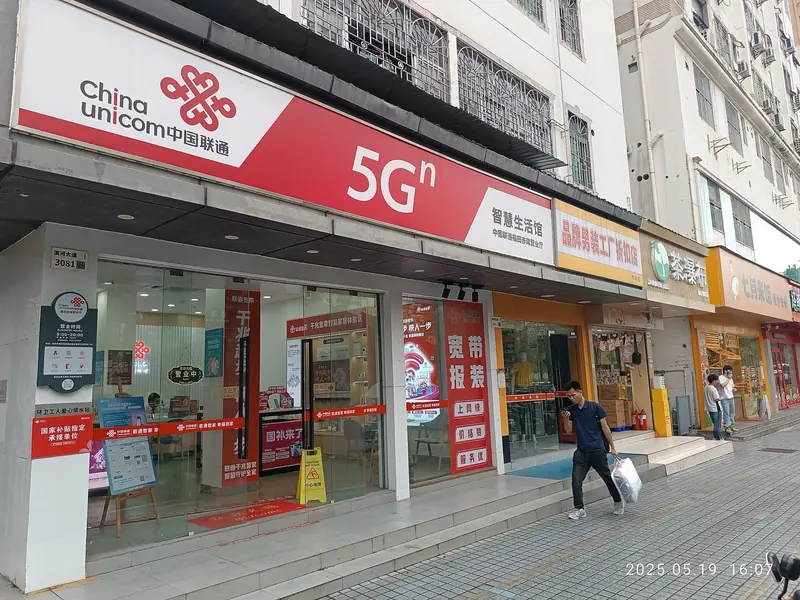
Airport or city shop?
Airport counters are easy to find, and staff at big international airports are more used to foreign passports. On the other hand, reports consistently say airport prices run higher and the choice of plans is smaller.
City shops have more plans and generally better prices, though staff may have less experience with foreign passports, and some branches may send you to a larger one. Bring a translation app. If you’re landing late or don’t want to hunt for a shop, the airport is still worth paying for. If you have a few days and some mobile data, a city branch near your hotel is likely better value.
Which carrier?
There are three main carriers: China Mobile, China Unicom and China Telecom. All three cover the cities and main tourist areas, and any of them will work for a visitor. China Mobile is the largest. Rather than choosing by brand, pick whichever shop is closest and compare the plans they offer you. Tourist-friendly plans change often, so we don’t list them here. Prices will appear on this page after a real purchase, not before.
Check your phone first
Your phone must be unlocked, and needs to take a physical SIM. That second part catches people out: iPhones sold in the US since the iPhone 14 have no SIM tray, and some other newer models are eSIM-only as well. If that’s your phone, a Chinese SIM card isn’t an option, so go with a roaming eSIM instead.
It’s also worth checking your phone’s network bands if it’s an older model or was sold for a small market. And keep your home SIM safe in your wallet, because your bank’s sign-in codes will still go to that number.
What changes with a Chinese SIM
Once it’s in, your phone is on a Chinese network. Chinese apps fly. Blocked apps look like they’re broken: they open and then don’t send or load. Nothing is wrong with your phone or the SIM. Our app table lists what to use instead.
A Chinese number also becomes part of your identity for local apps, so give it to the apps that need one and keep your home number on Alipay and WeChat if they’re already set up with it. Your SMS codes will go to whichever number you registered with.
When you leave, ask how the plan ends. Prepaid numbers generally lapse if you stop paying, but the rules differ between carriers, so check at the counter when you buy.
SIM, eSIM or pocket Wi-Fi?
Which one fits depends on whether you need Google and WhatsApp, or a Chinese phone number.
| Question | Roaming eSIM | Local SIM card | Pocket Wi-Fi |
|---|---|---|---|
| Google, WhatsApp, Instagram | Work | Blocked | Depends on device |
| Chinese phone number | No, data only | Yes, handy for food delivery and ride apps | No |
| How to get it | Online, install before you fly | Carrier store or airport counter, passport needed | Rent online, pick up at the airport |
| Phone needs | eSIM support | Unlocked, with a SIM slot | Nothing; carry and charge one more device |
Asked often
Can a tourist buy a SIM card in China?
Yes, in person at a carrier’s shop or airport counter, with your original passport and a live face photo.
Will WhatsApp and Google work on a Chinese SIM card?
No. A Chinese SIM connects inside China, so they’re blocked the same way as on hotel Wi-Fi. For those, use a roaming eSIM or your home carrier’s roaming.
Can I buy a China SIM card before I go?
You can order some online, but the real-name check still has to happen in person when you collect it. A SIM sold abroad as a “China SIM” may be a roaming product rather than a Chinese SIM, so read the listing to find out which you’re getting.
Which is the best SIM card for China?
All three carriers cover cities and tourist areas. We’d choose by the nearest shop and the plan on offer rather than by brand. We’ll add prices after our own purchase.
Can I use a Chinese SIM and an eSIM together?
Yes, on a dual-SIM phone. Many long-stay visitors use the SIM for a local number and the eSIM for data when they need blocked apps. Choose which line carries data in your phone’s settings.
How many SIM cards can a foreigner buy in China?
Reports say about three per passport. For a visitor, one is plenty.